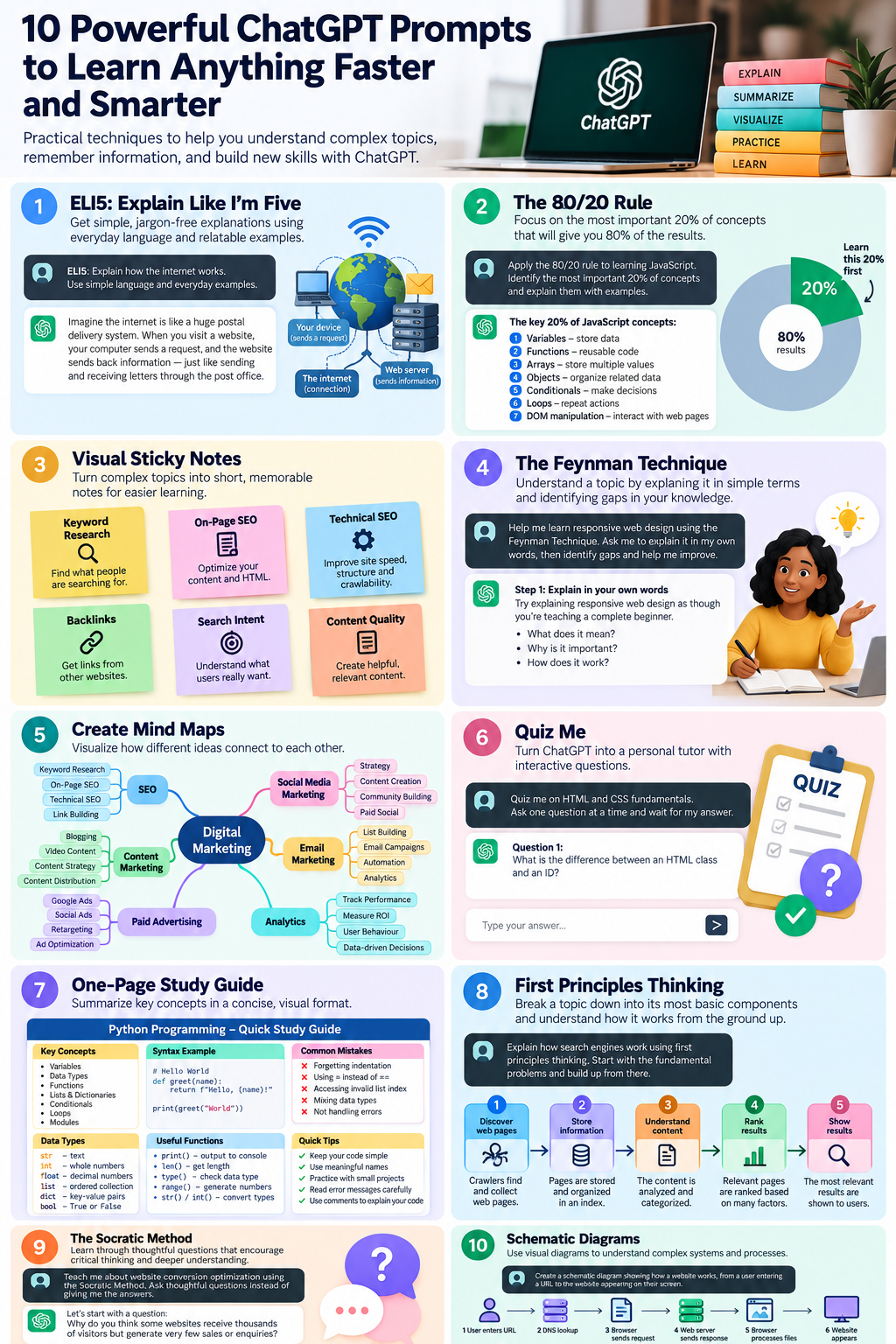
Discover 10 practical ChatGPT study techniques that can help you understand difficult topics, remember information, and learn new skills more effectively.
Learning something new can be challenging. Whether you're studying for an exam, learning to code, developing a professional skill, or exploring an unfamiliar subject, understanding and retaining information takes time.
But what if you could make the learning process easier with a few simple ChatGPT prompts?
Artificial intelligence has changed how we access and understand information. Instead of spending hours searching through textbooks, tutorials, and articles, you can use tools like ChatGPT to simplify complex concepts, organize information, test your knowledge, and create personalized study materials.
The secret isn't necessarily using more complicated AI prompts. Sometimes, a few simple instructions can completely change how ChatGPT explains information.
In this guide, we'll explore 10 powerful ChatGPT prompts and learning techniques you can use to study more efficiently, understand difficult subjects, and develop new skills.
Each technique includes an explanation, a practical example, and a ready-to-use prompt.
1. ELI5: Explain Like I'm Five

One of the easiest ways to understand a complicated subject is to ask ChatGPT to explain it as though you're five years old.
This technique is commonly called ELI5, which stands for Explain Like I'm Five.
The idea is simple: remove unnecessary jargon, complicated terminology, and overly technical explanations.
Instead, focus on making the concept understandable using everyday language and familiar examples.
How to use ELI5 in ChatGPT
Start your prompt with "ELI5" and describe what you want to learn.
Example prompt:
ELI5: Explain how the internet works. Use simple language, everyday examples, and analogies that someone with no technical background can understand.
ChatGPT can break down the explanation into smaller, easier-to-understand pieces.
For example, instead of explaining the internet using complicated networking terminology, it might compare the internet to a postal delivery system where computers send and receive packages of information.
When should you use ELI5?
This technique is particularly useful when:
- Learning a completely unfamiliar subject.
- Understanding technical terminology.
- Studying science, mathematics, or technology.
- Explaining complex ideas to beginners.
- Building foundational knowledge before exploring advanced concepts.
Pro tip: Once you understand the simplified explanation, ask ChatGPT to gradually introduce more advanced details.
This allows you to build your understanding step by step.
2. The 80/20 Rule: Learn the Most Important 20%

Not every piece of information is equally important.
When learning something new, certain concepts provide significantly more value than others.
This idea is closely related to the Pareto Principle, commonly called the 80/20 rule.
The principle suggests that approximately 80% of outcomes may come from 20% of the inputs.
Although this relationship doesn't apply precisely to every subject, it provides a useful framework for prioritizing what to learn.
Instead of trying to memorize everything, you can ask ChatGPT to identify the foundational concepts that will give you the greatest understanding.
How to use the 80/20 rule in ChatGPT
Example prompt:
Apply the 80/20 rule to learning JavaScript. Identify the most important 20% of concepts that will help me understand and perform approximately 80% of common beginner JavaScript tasks. Explain each concept with practical examples and recommend the order in which I should learn them.
ChatGPT might prioritize concepts such as variables, functions, arrays, objects, conditionals, loops, and DOM manipulation.
This gives you a focused starting point rather than an overwhelming list of everything you could possibly learn.
Why this technique works
The 80/20 approach helps you:
- Prioritize essential knowledge.
- Reduce information overload.
- Build useful skills more quickly.
- Create a focused learning roadmap.
- Avoid spending too much time on less relevant details.
Pro tip: After identifying the most important concepts, ask ChatGPT to create a seven-day or 30-day learning plan around them.
3. Create Visual Sticky Notes for Better Memory

Sometimes, reading long paragraphs isn't the most effective way to remember information.
Breaking concepts into short, memorable notes can make studying easier.
With ChatGPT, you can turn complicated subjects into a collection of virtual sticky notes.
Each note can contain one important idea, a brief explanation, and a practical example.
How to create sticky notes with ChatGPT
Example prompt:
Create a visual sticky-note study guide explaining the fundamentals of SEO. Each sticky note should cover one important concept, include a short explanation, and provide a practical example. Organize the notes into logical categories and use a visually appealing layout.
You can request sticky notes for concepts such as keyword research, on-page SEO, technical SEO, backlinks, and search intent.
Depending on the tools available in your ChatGPT experience, you can request an actual image-based study guide or a structured text layout that resembles sticky notes.
Why sticky notes are useful
Sticky-note learning can help you:
- Break down complex subjects into smaller pieces.
- Review information quickly.
- Organize related ideas.
- Create memorable study summaries.
- Identify concepts that need further attention.
Pro tip: Keep each sticky note focused on a single idea. Short, specific notes are generally easier to review than notes containing several unrelated concepts.
4. The Feynman Technique: Understand by Explaining

The Feynman Technique is a popular learning method associated with physicist Richard Feynman.
Its central idea is that explaining a concept in simple language can reveal how well you actually understand it.
If you struggle to explain something clearly, you may have gaps in your knowledge.
ChatGPT can help you apply this technique by acting as a beginner who needs you to teach them.
How to use the Feynman Technique
Example prompt:
Help me learn the concept of responsive web design using the Feynman Technique. First, ask me to explain it in my own words as though I'm teaching a complete beginner. Then identify gaps, inaccuracies, or confusing parts of my explanation. Help me improve it until I can explain the concept clearly and correctly.
ChatGPT can guide you through a simple learning cycle:
- Choose a concept you want to understand.
- Explain the concept using your own words.
- Identify areas where your explanation is unclear or incorrect.
- Review the missing information.
- Explain the concept again using simpler language.
Why the Feynman Technique is effective
Rather than passively reading information, this method encourages active learning.
It requires you to retrieve information, organize your thoughts, and communicate what you've learned.
This can help reveal misunderstandings that might otherwise go unnoticed.
Pro tip: Ask ChatGPT to challenge your explanation with follow-up questions.
5. Create Mind Maps to Connect Ideas

A mind map is a visual representation of information that shows how different concepts relate to one another.
Instead of presenting information as a long list, mind maps organize ideas around a central topic.
This makes them useful for understanding subjects with many interconnected concepts.
ChatGPT can help you plan and create mind maps for almost any topic.
How to create a mind map with ChatGPT
Example prompt:
Create a detailed mind map about digital marketing. Put "Digital Marketing" at the center and branch into SEO, content marketing, social media marketing, email marketing, paid advertising, and analytics. Include important subtopics under each branch and show how the concepts connect.
The resulting mind map can help you understand how different areas of digital marketing fit together.
Benefits of mind mapping
Mind maps are useful for:
- Understanding relationships between concepts.
- Brainstorming ideas.
- Planning projects.
- Organizing research.
- Reviewing complicated subjects.
- Identifying gaps in your knowledge.
Pro tip: Ask ChatGPT to create a mind map using Mermaid syntax if you want a structured diagram that can be rendered or edited in a compatible tool.
6. Quiz Me: Turn ChatGPT Into a Personal Tutor

Reading something once doesn't necessarily mean you'll remember it.
One way to strengthen learning is through active recall, which involves retrieving information from memory instead of simply rereading it.
ChatGPT can act as a personal tutor by asking questions and evaluating your answers.
The key is to make the quiz interactive.
Rather than receiving 20 questions at once, ask ChatGPT to quiz you one question at a time.
How to use the Quiz Me prompt
Example prompt:
Quiz me on HTML and CSS fundamentals. Ask one question at a time and wait for my answer before continuing. After each response, tell me whether I'm correct, explain any mistakes, and gradually increase the difficulty. Continue until I demonstrate a strong understanding of the topic.
This creates an interactive learning experience.
For example, ChatGPT might ask:
Question: What is the difference between an HTML class and an ID?
After you answer, it can evaluate your response and provide feedback before moving to the next question.
Why interactive quizzes help
Quizzing encourages you to retrieve information from memory.
It also helps you:
- Identify weak areas.
- Measure your progress.
- Practice applying knowledge.
- Build confidence.
- Prepare for exams and interviews.
Pro tip: Ask ChatGPT to revisit questions you answered incorrectly later in the session.
7. Generate a One-Page Visual Study Guide

When studying a large subject, it can be difficult to remember all the important information.
A one-page study guide helps summarize the key concepts in a compact format.
Instead of reviewing an entire textbook chapter or lengthy article, you can use a single reference sheet to revisit essential information.
ChatGPT can organize the material into sections, definitions, examples, and quick-reference tables.
How to create a visual study guide
Example prompt:
Create a one-page visual study guide covering the fundamentals of Python programming. Include the most important concepts, short definitions, practical code examples, common mistakes, and a quick-reference section. Make it beginner-friendly, easy to scan, and suitable for revision.
You can also request:
- A printable layout.
- A comparison table.
- A cheat sheet.
- A step-by-step reference guide.
- A diagram-based summary.
When to use a one-page study guide
This approach works particularly well when preparing for examinations, reviewing technical concepts, learning software shortcuts, or summarizing a course.
Remember that a one-page guide is a revision aid, not necessarily a complete substitute for studying the underlying material.
Pro tip: Ask ChatGPT to highlight the five concepts you are most likely to forget or misunderstand.
8. First Principles Thinking: Understand the Fundamentals

First principles thinking is a method of understanding a problem by breaking it down into its most basic components.
Instead of accepting existing explanations or assumptions, you examine the foundational facts and build your understanding from there.
This approach can be especially useful when learning complicated technical or scientific subjects.
How to use first principles thinking with ChatGPT
Example prompt:
Explain how search engines work using first principles thinking. Start with the most fundamental problems a search engine needs to solve. Break the system into its basic components and explain how those components work together. Avoid unnecessary assumptions and gradually build toward a complete understanding.
Rather than immediately discussing ranking algorithms, ChatGPT might begin with fundamental questions:
- Why do people need search engines?
- How can information from websites be discovered?
- How can that information be stored and organized?
- How can a search engine determine which results are relevant?
- How can results be delivered quickly?
By examining these questions individually, you can build a deeper understanding of the overall system.
Benefits of first principles thinking
This technique can help you:
- Understand the reasons behind how things work.
- Challenge assumptions.
- Develop problem-solving skills.
- Analyze complicated systems.
- Build stronger foundational knowledge.
Pro tip: Ask ChatGPT to separate established facts from assumptions and simplified explanations.
9. The Socratic Method: Learn Through Questions

The Socratic Method is a teaching approach based on asking thoughtful questions.
Rather than simply giving someone an answer, the teacher guides them toward understanding through questioning and reasoning.
ChatGPT can use a similar approach to help you explore a subject.
This is particularly valuable when you want to develop critical thinking rather than memorize information.
How to use the Socratic Method
Example prompt:
Teach me about website conversion optimization using the Socratic Method. Don't immediately give me the answers. Instead, ask thoughtful questions one at a time that encourage me to reason through the concepts. Challenge my assumptions, help me identify mistakes, and guide me toward a deeper understanding.
For example, ChatGPT might begin by asking:
Why do you think some websites receive thousands of visitors but generate very few sales or enquiries?
After you respond, it can ask another question that builds on your reasoning.
Over time, the conversation can help you discover important principles through your own thinking.
Why the Socratic Method is powerful
This approach encourages:
- Critical thinking.
- Independent reasoning.
- Deeper understanding.
- Better problem-solving.
- More thoughtful decision-making.
Pro tip: Tell ChatGPT not to reveal the answer until you've made at least two attempts to reason through the problem.
10. Create Schematic Diagrams to Understand Complex Systems

Some subjects are much easier to understand when you can see how their components connect.
A schematic diagram is a simplified visual representation of a system, process, or structure.
It focuses on relationships and functionality rather than unnecessary visual details.
ChatGPT can help you create schematic diagrams to explain technical concepts, workflows, and processes.
How to create a schematic diagram with ChatGPT
Example prompt:
Create a clear schematic diagram showing how a website works, from a user entering a URL in their browser to the website appearing on their screen. Include DNS lookup, the web server, HTTP requests, HTML, CSS, JavaScript, and the browser rendering process. Use arrows, labels, and brief explanations.
A simplified representation might look like this:
User enters URL → DNS lookup → Browser connects to server → Server sends response → Browser processes resources → Website appears
This gives you a visual overview of the process before exploring each component in greater detail.
When are schematic diagrams useful?
They are especially useful for learning:
- Web development.
- Computer networking.
- Engineering systems.
- Business processes.
- Software architecture.
- Scientific processes.
- Automation workflows.
Pro tip: Ask ChatGPT to create a Mermaid flowchart or an image-based diagram, depending on whether you need an editable structure or a visual reference.
How to Combine These 10 ChatGPT Techniques for Better Learning
Although each technique is useful independently, combining several approaches can create a more structured learning experience.
For example, imagine you want to learn Webflow development.
You could organize your learning process like this:
| Step | Technique | Purpose |
|---|---|---|
| 1 | ELI5 | Understand what Webflow is |
| 2 | 80/20 Rule | Identify essential Webflow skills |
| 3 | Mind Map | Organize the main concepts |
| 4 | First Principles | Understand how websites work |
| 5 | Visual Study Guide | Summarize essential knowledge |
| 6 | Feynman Technique | Explain what you've learned |
| 7 | Quiz Me | Test your understanding |
| 8 | Socratic Method | Develop deeper reasoning |
| 9 | Sticky Notes | Review important concepts |
| 10 | Schematic Diagrams | Understand technical workflows |
You don't need to use all 10 techniques every time you study.
Instead, select the methods that best match your learning goals.
For example, visual learners may find diagrams and mind maps helpful, while someone preparing for an examination may benefit more from quizzes and repeated recall practice.
Combining explanations with practical exercises, feedback, and spaced review can be especially valuable.
Bonus: An All-in-One ChatGPT Prompt for Learning Any Subject
If you don't want to type separate prompts every time, you can combine several techniques into one comprehensive instruction.
Copy and paste this prompt into ChatGPT:
Act as an experienced personal tutor and learning coach.
I want to learn [INSERT TOPIC].
Help me understand this subject using the following process:
- ELI5: Start with a beginner-friendly explanation using simple language and relatable examples.
- 80/20 Rule: Identify the most important concepts I should learn first.
- First Principles: Break the topic down into its fundamental building blocks.
- Mind Map: Create a structured mind map showing how the main concepts connect.
- Visual Study Guide: Summarize the essential information in a concise, easy-to-review format.
- Feynman Technique: Ask me to explain what I've learned and identify gaps in my understanding.
- Socratic Method: Challenge my understanding using thoughtful questions.
- Active Recall: Quiz me one question at a time and provide feedback.
- Sticky Notes: Create short revision notes highlighting the most important ideas.
- Practical Application: Give me a real-world exercise that allows me to apply what I've learned.
Adapt your explanations to my current knowledge level. Ask me about my experience before starting, introduce concepts gradually, and don't move to more advanced material until I've demonstrated an understanding of the fundamentals.
You can customize this prompt for almost any subject, including programming, mathematics, digital marketing, business, design, or language learning.
Common Mistakes to Avoid When Using ChatGPT for Studying
AI can be a valuable learning assistant, but how you use it matters.
Relying entirely on AI-generated answers
ChatGPT can make mistakes or provide incomplete explanations. Verify important information using reliable sources, official documentation, textbooks, or qualified instructors.
Reading without practicing
Understanding an explanation is different from being able to apply it. Use exercises, projects, and quizzes to reinforce what you've learned.
Using overly vague prompts
Instead of asking "Teach me programming," specify the programming language, your experience level, and the outcome you want to achieve.
Trying to learn everything at once
Focus on foundational concepts before moving into advanced topics.
Skipping revision
Revisit important information over time rather than relying on a single study session. Spaced repetition and active recall can help strengthen long-term retention.
Frequently Asked Questions
Can ChatGPT really help me learn faster?
ChatGPT can make learning more efficient by simplifying explanations, organizing information, generating practice questions, and providing immediate feedback. However, actual learning progress depends on factors such as practice, accuracy of information, and consistent revision.
What is the best ChatGPT prompt for studying?
There isn't one prompt that works best for every situation. ELI5 is useful for understanding unfamiliar concepts, the Feynman Technique helps reveal knowledge gaps, and interactive quizzes are useful for practicing recall.
Can I use ChatGPT to learn programming?
Yes. ChatGPT can explain programming concepts, generate code examples, help debug errors, and create practical exercises. However, writing code yourself and checking explanations against official documentation remain important.
Is ChatGPT better than traditional studying?
ChatGPT is best used as a complement to traditional learning resources rather than a complete replacement. Combining AI assistance with reliable educational materials, practical work, and self-testing can create a more effective learning process.
Can ChatGPT create visual study materials?
Yes. Depending on the available features, ChatGPT can help produce mind maps, diagrams, structured study sheets, flashcards, and visual summaries.
Do I need to memorize these 10 prompts?
No. You can save the prompts in a document or bookmark this article for future reference. The important thing is understanding when and how to use each technique.
Final Thoughts: Make ChatGPT Your Personal Learning Assistant
Learning doesn't have to mean spending endless hours reading complicated explanations or memorizing information without understanding it.
With the right prompts, ChatGPT can become a useful learning companion that helps you simplify difficult topics, organize knowledge, practice new skills, and test your understanding.
From ELI5 explanations and the 80/20 rule to the Feynman Technique, Socratic questioning, and visual study guides, these 10 approaches give you different ways to engage with new information.
The most important thing is to use AI actively.
Don't just ask ChatGPT for answers. Ask it to challenge your thinking, evaluate your explanations, create exercises, and help you apply what you've learned.
The goal isn't simply to get information faster. It's to understand it better and use it effectively.
Need Help Building a Better Digital Experience?
At Made by Olayinka, we specialize in creating modern, responsive, high-performing websites using Webflow, Framer, WordPress, and custom development.
Whether you're launching a new business website, redesigning an existing platform, or improving your website's performance, we can help bring your ideas to life.
Explore Our Web Design & Development Services